
Key Takeaways
- Upload a CSV or spreadsheet from QuickBooks, Xero, your booking system, or your bank into ChatGPT, Claude, or Gemini and ask questions in plain English
- No formulas, no pivot tables, no new software — it works on the free tier of every major tool
- Strip customer names, addresses, phone numbers, and card details before you upload; job type, date, amount, and category answer nearly everything
- Start by asking what's in the file and what it can't answer — then ask the questions you've never had an afternoon to dig into
- Use this to find things worth looking into, not to make the final call — spot-check arithmetic and push back on patterns that might be noise
There's a file on your computer with a year of your business in it.
An export from your booking system. A sales spreadsheet. Invoices from your accounting software. Somewhere there's a record of every job, every customer, every amount.
You almost never open it. Mostly because getting anything out of it means sorting, filtering, building a pivot table, and losing an afternoon. So the questions you'd genuinely like answered — which customers actually make you money, when does the phone go quiet, what's a typical job worth now versus last year — go unanswered.
That changed. You can upload that file and ask it questions in plain English.
No formulas. No pivot tables. No new software. It works on the free tier of every major tool.
Here's exactly what that looks like.
Getting the file
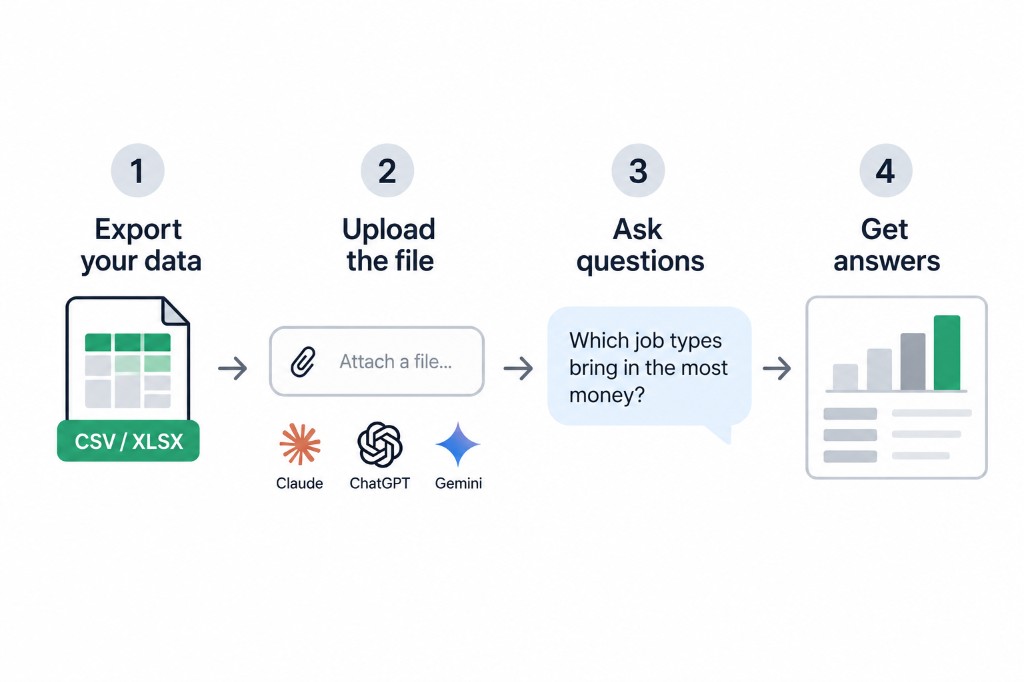
You need one file with your data in it. A spreadsheet, or a CSV — which is what you get when you export from most business software.
Where it comes from depends on what you run:
- Accounting software — QuickBooks, Xero, FreshBooks all export invoices or sales to a spreadsheet
- Booking or scheduling software — nearly all of it has an export button, usually under reports or settings
- A spreadsheet you keep by hand — already fine as-is
- Your bank — most let you download transactions as a CSV
It doesn't need cleaning up. Messy is fine. Missing entries are fine. The columns can be named badly.
One thing to sort out before you upload anything, because it matters more than the rest of this: strip out what you don't need to include, especially sensitive data. If the file has customer names, addresses, phone numbers, or card details, delete those columns first. You almost never need them for the questions you're asking, and if you work in dental, medical, legal, or finance, you have obligations that a free chat window does not cover. Job type, date, amount, and category will answer nearly everything without a single person's name in it. (Same boundary we drew in what AI is actually bad at and the contract prompt: don't put sensitive data in a free chat window.)
Uploading it
In ChatGPT, Claude, or Gemini, there's a paperclip or plus icon next to where you type. Click it, pick your file, wait a few seconds.
Then you just ask
This is the part people don't believe until they try it. You type questions the way you'd say them out loud.
Start here, because it tells you whether the file is any good before you rely on anything:
Copy everything below this line
I've uploaded a file of my business data. Before I ask you
anything about it, tell me what's actually in here — what
each column appears to be, what date range it covers, and
how many records there are.

Then tell me what's missing, unclear, or looks wrong, and
what questions this data honestly can't answer.
That last part matters, because now it'll tell you if half your entries have no date on them, or if two columns contradict each other. Better to find that out now than to act on a number that was never solid.
Then ask what you actually want to know:
What were my five biggest months, and what was different
about them?

Which types of jobs bring in the most money? Now show me
the same list ranked by how many of them I did.

Which customers have spent the most with me over this
period? Are any of them spending less lately than they
used to?

Is there a pattern to when things go quiet? Show me by
month and by day of the week if the data supports it.

What's my average job worth, and has that changed across
the period?
You don't need to phrase them well. Just be curious and ask questions.
What it looks like when it works
Say you run a home service business and you upload eighteen months of jobs. You ask which job types make the most money.
It comes back with your top category by revenue — the one you'd have guessed. But it also shows you that a second category you barely think about has a higher average value per job, you just do very few of them.
That's a genuinely useful thing to know, and it was sitting in a file you already had. Nobody was hiding it from you. It just took an afternoon to find, so you never looked.
That's the actual unlock here. Not that AI is clever. That the cost of asking a question of your own numbers dropped from an afternoon to about twenty seconds, so you can afford to ask questions you'd never have bothered with.
The part where you have to be careful
Two real limits, and I'd rather you hear them from me than find them out later.
It can get arithmetic wrong. These tools are good at understanding what you're asking and finding patterns. They are not calculators. Before you act on any number, ask it: how did you work that out, and which rows did you use? If the answer is vague, don't trust it. Spot-check anything you're going to make a decision on.
It can find patterns that aren't there. Ask it why sales dropped in November and it will produce a confident explanation, whether or not the data supports one. Push back. Ask if the pattern is strong enough to mean anything or whether it could just be noise. A good answer will admit uncertainty.
The rule that keeps you out of trouble: use this to find things worth looking into, not to make the final call. It's a way of noticing what's interesting in your own numbers. You still do the deciding.
Try it once
Pick your most boring file. The one you exported months ago and never opened.
Upload it, run the first prompt, and ask it two questions you've genuinely wondered about but never had a spare afternoon to answer.
It takes about ten minutes. Most owners find at least one thing that surprises them — and it was theirs the whole time. Once you're done with the first pass, you can keep building on the analysis over time. Before you know it, you can have your own internal dashboard, weighted in your data.
— Aristotle Taylor, CEO & Co-Founder, Levron Labs
What to do with this
Export one file today — invoices, jobs, or bank transactions. Strip the personal columns. Upload it. Run the first prompt. Ask two questions you've never had time to dig into.
If what you find points at a deeper ops problem — quoting, follow-up, scheduling — start with a free ops assessment. We'll map the gap between what your numbers say and what your software thinks your operation does.