
Key Takeaways
- Every major AI app — ChatGPT, Claude, Gemini — has a camera button next to the text box that almost nobody uses
- It reads handwritten notes, receipts, invoices, contracts, parts, spec plates, and competitors' marketing on sight
- The trick is asking a question with the photo, not just sending it — 'type this up as a list' beats a bare photo every time
- It's strong at reading what's in front of it, weak at guessing what it can't see — check totals and treat part numbers as a starting point
- Never photograph anything with someone's personal information in it — business information is fine, individual people's private data is not
A while back we wrote about the microphone button — the one almost nobody presses, even though talking runs about 150 words a minute against roughly 40 for typing. It was one of the most useful things we've published so far.
There is a second button right next to it that almost nobody uses either.
The camera button
You can take a picture of something and ask about it. Not a scan, not a special app, not a subscription to anything new. Point your phone at a thing, take the photo, ask a question about it.
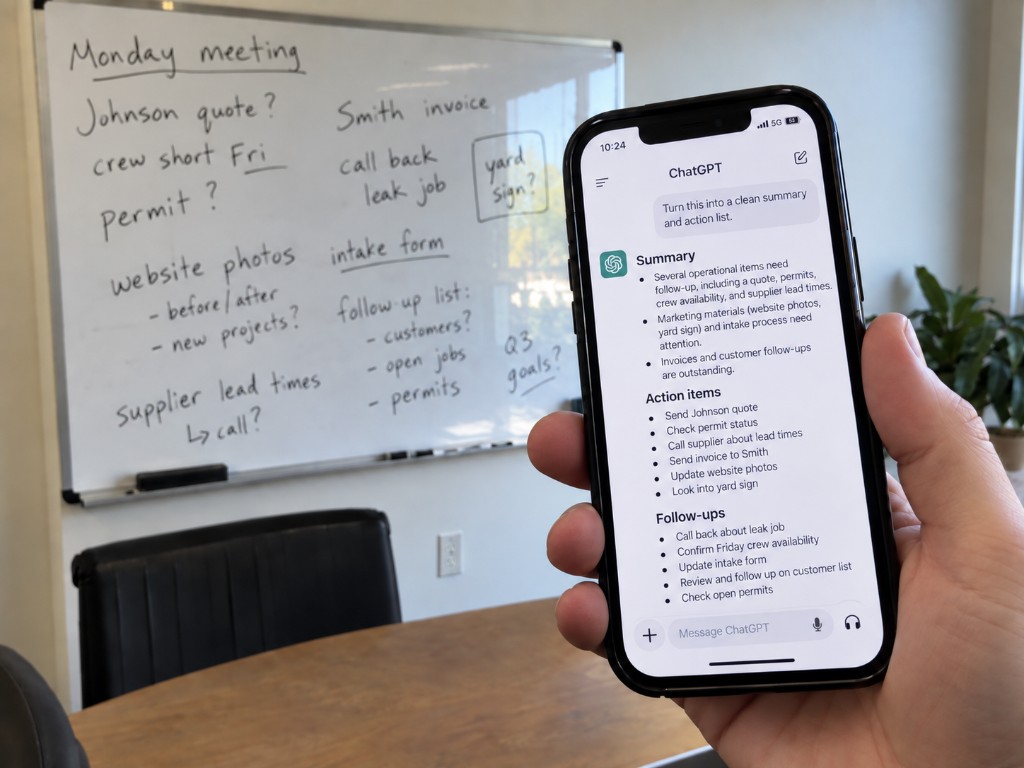
Here's exactly what it's good for.
Handwritten anything
Take a photo of your notes from a site visit or customer call, or a scribbled estimate on the back of a job sheet. Ask it to type that up properly.
This is the one worth trying first, because everyone has some version of it. Notebooks full of things that never made it into a system. Notes from a meeting three weeks ago that you meant to write up.
It reads bad handwriting better than you would expect. Mine included.
Receipts, invoices, and bills
Photograph a stack of receipts and ask it to list them with dates, vendors, and amounts. Ask it to total the amounts by category.
Photograph a supplier invoice and ask what changed compared to the last one.
Take a photo of your utility bill. Then ask what each charge is for. Many bills are hard to read on purpose.
Parts, equipment, and things you do not recognize
Photograph a fixture, a fitting, a part number, a piece of equipment. Ask what it is, what it's for, what people typically call it, and what a replacement costs.
This is genuinely strong for trades and auto. Not necessarily good for finding something obscure — but it's great for understanding what you're looking at and what to search for.
Same goes for a spec plate or a label. Photograph it and ask what the numbers mean.
A page of a contract
You do not need to upload the whole document. Photograph the page you're stuck on and ask what it means in plain English.
The same limits as always apply. It is not legal advice, and anything serious still goes to a lawyer. But for the ordinary question of what a paragraph is actually saying, a photo and a question takes ten seconds. (Same boundary we drew in what AI is actually bad at: use it where you can spot a mistake, not where you can't.)
Competitors' marketing
Photograph a flyer, a van wrap, a mailer, a sign, a menu. Ask what makes it work, who it's aimed at, and what it's trying to get someone to do.
This is the same trick as the ad library we discussed. It focuses on physical marketing. Most local businesses prefer this over digital.
A whiteboard or a form
Photograph a whiteboard at the end of a meeting and ask for it as a clean list.
Photograph a paper form and ask for a fillable version of the form that you can fill in and send.
How to actually do it
In ChatGPT, Claude, or Gemini on your phone, there's a camera or paperclip icon next to where you type. Tap it, take the photo or pick one from your roll, then type your question.
Ask a question, don't just send the photo
Sending a picture with no question gets you a description of the picture, which is useless. "Type this up as a clean list" or "what is this part and what does a replacement cost" gets you something worth having.
Where it falls down
Three honest limits.
It is genuinely good at reading receipts and invoices, but check the totals anyway. A wrong figure that looks right is worse than no figure at all.
It will guess confidently about parts. If it gives you a model number for something rare, treat it as a starting point. Use it for your search, but don't treat it as the final answer. It does not know it is unsure.
Business information is fine. Personal information is not.
Do not photograph anything with someone's personal information in it — patient records, signed documents with customer details, anything with card numbers. Same rule as always. Business information is fine, individual people's private information is a different category.
The thing worth noticing
You don't need to type much anymore. You can often use a microphone and a camera to pull information out of your own head, or off a piece of paper, instead.
The barrier was never that these tools couldn't do it. It was that the buttons are small, unlabeled, and nobody tells you what they're for.
Try one this week. Photograph the messiest page of notes you have and ask it to type them up. Ten seconds, and it's the kind of thing that changes how you handle paper from then on.
— Aristotle Taylor, CEO & Co-Founder, Levron Labs
What to do this week
Pick the pile that's been sitting the longest — the receipts, the site-visit notebook, the whiteboard nobody's photographed. Take one picture, ask one question, and see what comes back.
If the real problem is that paper keeps piling up faster than anyone has time to enter it, that's a workflow gap, not a willpower gap. Start with a free ops assessment — we'll map where information is getting stuck on paper and what a system could capture automatically instead.